Traverse
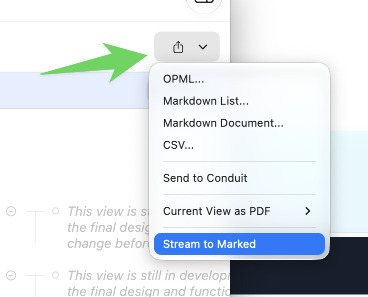
Traverse includes a built-in Stream to Marked command. It appears in the export menu when Marked 2 or Marked 3 is installed.
Stream to Marked
Open the export menu (the button with an upward arrow) and choose Stream to Marked.
What Traverse sends depends on the outline:
- If you have added the Type attribute, Traverse sends the same Markdown it uses for Markdown export.
-
If the format in Traverse is set to Fountain, the preview automatically enables Fountain rendering. Traverse starts the streamed text with
<!--format:fountain-->, which is what turns that rendering on. See Streaming Preview. - If neither is selected, Traverse sends a simple Markdown list.